Scene Stream
Live drone video with AI that tells you what it sees.
Stream live aerial video from any drone to anyone with a browser. Scene Stream records every flight, maps the aircraft, and runs vision AI on the feed — narrating the scene, counting crowds, flagging speeders, and finding what you tell it to look for.
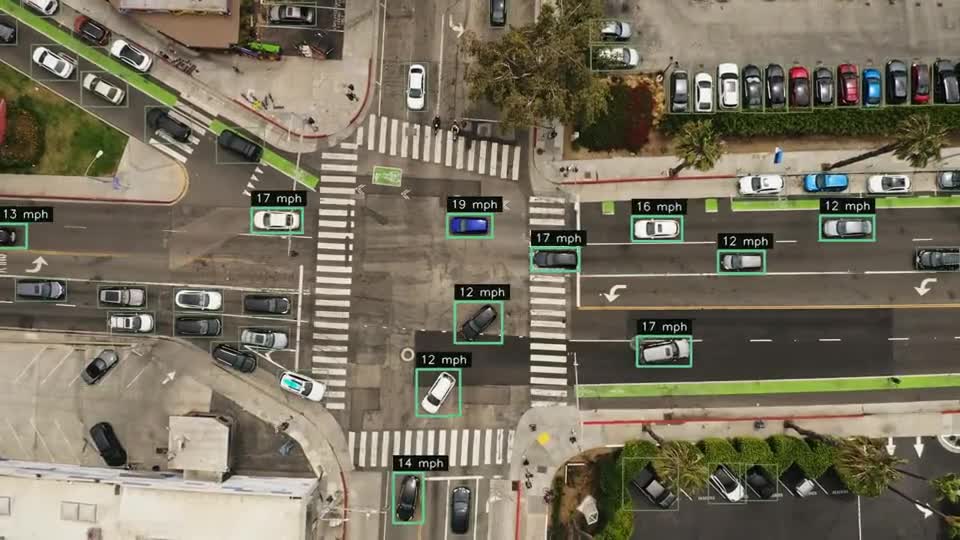
See Scene Stream in action
An interactive preview of the Scene Stream console. Click the tabs to explore — the footage and data shown are simulated.
Live Video
Map
Analytics
Flight Events
Watching Now
From flight to answers
- 01
Point your aircraft at a channel
Send video from your drone controller, encoder, or camera to your organization's streaming address. Name the channel anything — it goes live the moment you start streaming.
- 02
Share a link
Commanders, clients, and stakeholders watch in any modern browser — desktop, tablet, or phone. No app, no plugin.
- 03
Let the AI watch with you
Vision models describe the scene in the Scene Log, analyze crowds, monitor speeds against the limit you set, and search for what you tell them to look for.
- 04
Review after the flight
Recordings, scene logs, and flight events stay organized by channel for after-action review, training, and reporting.
Scene Stream turns any drone mission into a shared, searchable, analyzed live feed — so the people making decisions see what the pilot sees, in real time, and the record is still there when the flight is over.
Everyone sees what the pilot sees
Put a live aerial view in front of every decision-maker — whether they're at the command post, in the EOC, or across the country.
- Browser playback on desktop, tablet, and phone
- Live/offline status for every channel
- Pop the feed into its own window
- See who's watching now
A scene log written by AI
Scene Stream's vision model narrates the flight in plain language — what it saw, and when. Scroll back through the log instead of scrubbing through hours of video.
- Time-stamped, readable descriptions
- Captured live, kept with the recording
- Built for after-action reports
Analytics that run while you fly
Turn the feed into answers in real time, with tools designed for public safety and event operations.
- Crowd analysis for density and movement
- Speed monitoring against a limit you set
- Visual search — tell it what to look for
Video and map, side by side
Know exactly where the aircraft is and what's happened on the flight, alongside the live feed.
- Live aircraft position on the map
- Flight events timeline
- Multiple aircraft and channels per organization
What Scene Stream does
Low-latency live video
Stream from the aircraft to any browser. Viewers see the feed in seconds, no app required.
Recording & playback
Start, stop, and manage recordings by channel, with every flight archived for after-action review.
Scene Log
What the vision model saw, in its own words — a searchable, time-stamped narrative of every flight.
Analytics suite
Crowd analysis, speed monitoring, and visual search across live and recorded video.
Live map
Aircraft position and flight events on a map alongside the video feed.
Organizations & roles
Multi-organization accounts with user management, channel control, and a live 'watching now' view.
Built for your team
Public safety
Put eyes over an incident in front of everyone who needs them, wherever they are.
Events & venues
Monitor crowd density and movement during large gatherings.
Inspection & construction
Let remote engineers and clients direct the flight in real time.
Specs
- Video input
- RTMP from drone controllers, encoders, and cameras
- Viewing
- Any modern browser — desktop, tablet, phone
- Recording
- On-demand, organized by channel
- AI tools
- Scene Log, crowd analysis, speed monitoring, visual search
- Accounts
- Organizations, users, and admin roles
- Hosting
- Cloud-hosted and supported by Triangle UAS
Common questions
Which drones and cameras work with Scene Stream?
Anything that can send an RTMP stream — most drone controllers and apps, hardware encoders, and many cameras. We'll help you set up your aircraft.
Do viewers need to install anything?
No. Viewers watch in a web browser. Your organization's user accounts control who has access.
Can we keep the video?
Yes. Start a recording from the console and it's saved to the channel, along with the scene log and flight events, until you delete it.
Is it only for public safety?
No — it's also used for events and venues, inspections, construction, and anywhere remote teams need to see the site live.
See Scene Stream with your own data.
We'll walk you through it with your sites, your use case, and your questions.